A website can look great, load quickly and contain useful content, but that alone does not mean Google can find it, understand it and display it correctly in search results.
This is where Technical SEO comes in.
Technical SEO is the technical foundation that supports a website’s organic visibility. Before we focus on keywords, content or rankings, we first need to make sure that search engines can discover the right pages, crawl them, process them and eventually index them.
It may sound technical, but the basic logic is simple.
For a page to appear on Google, Google first needs to be able to find itστεί μια σελίδα στη Google, πρέπει πρώτα να μπορεί να τη βρει.
What Is Technical SEO?
Technical SEO is the part of SEO that focuses on how a website communicates technically with search engines.
It is not only about page speed or achieving a good score in a testing tool. It covers the entire process through which Google discovers and understands the pages of a website.
Some of the main elements of Technical SEO include:
- crawlability
- correct indexing
- URL structure
- XML sitemaps
- robots.txt
- canonical URLs
- redirects
- internal links
- structured data
- mobile usability
- website performance and technical stability
All of these elements work together.
Not every website needs a complex technical architecture. It does, however, need to avoid creating unnecessary obstacles for Google.
Crawling and Indexing Are Not the Same Thing
The two terms are often used as if they mean the same thing, but they describe different stages.
Crawling
Crawling is the process through which Google’s systems discover and visit URLs.
Google can find a page through:
- an internal link
- an external link
- an XML sitemap
- another page it already knows
- a previous crawl
When Googlebot visits a page, it tries to read the content and understand its structure.
That does not automatically mean the page will be added to Google’s index.
Indexing
Indexing is the next stage.
Google processes the page and decides whether to include it in its index.
In simple terms:
Crawling means Google found the page.
Indexing means Google decided to store the page so it may become eligible to appear in search results.
A page can therefore be crawled without being indexed.
This is one of the most common points of confusion when someone sees in Google Search Console that a URL has been crawled but does not appear in Google Search.
How Does Google Discover the Pages on a Website?
Google does not automatically know every new URL that is created.
There has to be a way for Google to discover it.
One of the most important factors is the internal structure of the website.
If a new page is linked naturally from other relevant pages, Google has a clear path to it.
This is why internal links are not only useful for visitors. They also help search engines understand:
- which pages exist
- how those pages relate to one another
- which pages are more important
- what the topical context of each page is
A page that technically exists but is not linked from anywhere can become what is commonly called an orphan page.
That is not a strong foundation for organic growth.
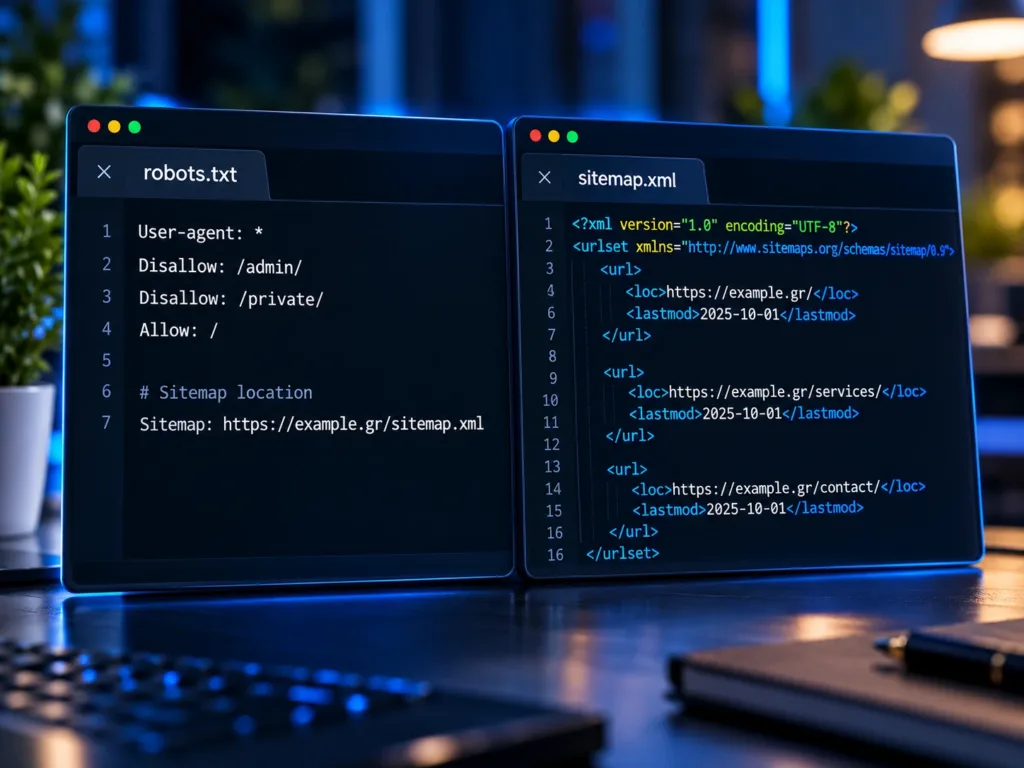
The Role of the XML Sitemap
An XML sitemap works like an organized list of URLs that we want search engines to know about. It does not guarantee that a page will be indexed. It does, however, help Google discover the URLs we consider important. A clean sitemap should include the actual canonical pages of the website and should generally avoid:
- redirects
- URLs that return errors
- pages with noindex
- duplicate versions
- temporary or unnecessary URLs
Sitemaps become especially useful on larger websites, e-commerce stores or systems where new pages are created regularly.
What Does robots.txt Actually Do?
The robots.txt file is used to provide instructions to crawlers about which areas of a website they are allowed or not allowed to crawl.
There is an important distinction here.
robots.txt mainly controls crawling. It is not, by itself, a reliable way to remove a URL from Google’s index.
If we want a page not to be indexed, we usually need to consider a directive such as noindex, depending on the case.
There is another detail that often causes confusion. If access to a page is blocked completely through robots.txt, Google may not be able to visit the page and see its noindex directive.
Technical directives should therefore be used for a specific purpose, not applied mechanically.
Canonical URLs and Duplicate Content
On many websites, the same or very similar content can be available through more than one URL.
Examples include:
- URL variations with parameters
- filtered page versions
- duplicate category pages
- HTTP and HTTPS versions
- alternate URL structures
The canonical tag helps indicate which URL we consider the main version. It is not a command that forces Google to choose a specific URL. It is a strong signal. Problems begin when canonicals, internal links, sitemaps and redirects point in different directions. Good Technical SEO aims to make these signals consistent.
Redirects: When They Help and When They Cause Problems
Redirects are necessary when a URL changes.
If an old page is replaced by a new one, a correct 301 redirect helps both visitors and search engines reach the new destination.
Problems begin when a website accumulates:
- redirect chains
- redirects to unrelated pages
- redirect loops
- old URLs with no meaningful destination
- internal links that still point to old URLs
A clean website should link directly to the final destination whenever possible.
A redirect is a transition mechanism, not a permanent site architecture.
Technical SEO and On-page SEO
Technical SEO does not replace On-page SEO.
The two work together.
Technical SEO makes sure the search engine can access and process the page correctly.
On-page SEO helps the search engine understand what the page is about and why it may be useful for a search query.
On-page SEO includes elements such as:
- the SEO title
- the meta description
- the H1
- a clear H2 and H3 hierarchy
- the main content
- alignment with search intent
- internal links
- images and alt attributes
- a clear URL
- calls to action
An excellent article with a poor technical setup may struggle to perform. At the same time, a technically perfect page without useful content has little reason to rank. SEO needs both.

JavaScript and Modern Websites
Modern websites increasingly use JavaScript, frameworks and dynamic data. That is not a problem by itself. Google can process JavaScript, but the architecture still needs to be implemented correctly. The real question is not whether a website uses React, Next.js or another technology.
The real questions are whether:
- the main content is accessible
- real URLs exist
- internal links can be followed
- metadata is correct
- the page returns the correct HTTP status
- the canonical is consistent
- Google can access the same meaningful content that users can see
Technology should support the discoverability of information, not stand in its way.
Why Might a Page Not Appear on Google?
There is no single cause.
Some common reasons include:
- Google has not discovered the URL yet
- the page has too few internal links
- a noindex directive is present
- a technical rule blocks crawling
- the canonical is incorrect
- the URL redirects elsewhere
- the server returns an incorrect status code
- the content is too similar to another page
- Google considers another URL to be the better canonical version
- the content does not provide enough distinct value
- the page is very new and has not been fully processed yet
The important point is not to draw conclusions only from the fact that a URL does not appear in search results. First, diagnose the reason.
Google Search Console: The Core Diagnostic Tool
Google Search Console is one of the most important tools for understanding how Google sees a website.
With URL Inspection, we can examine a specific URL and review information about:
- indexing status
- the most recent crawl
- the canonical URL
- possible issues
- whether the page is available to Google
Search Console should not be treated only as a place where we click Request indexing. Its real value is diagnosis. If an important page is not indexed, the right first question is “why?” rather than simply “how can I force Google to index it?”
A Simple Technical SEO Checklist
If you want to carry out a first technical check of your website, start with these points:
- Does the URL load correctly?
The page should return the correct status and should not accidentally redirect or return an error. - Is the page indexable?
Check whether a noindex directive or another rule prevents indexing. - Is the canonical correct?
The canonical should point to the correct version of the page. - Is the page included in the sitemap?
Important canonical pages should appear in the XML sitemap. - Are there internal links to the page?
The page should be a natural part of the website’s architecture. - Is the content unique and useful?
Technical accessibility alone is not enough. - Does the metadata describe the page correctly?
The SEO title, description and heading structure should support the actual topic of the page. - What does Search Console show?
URL Inspection and indexing reports can provide useful clues before making changes without evidence.
Technical SEO Is Not a One-time Task
A website changes continuously. New pages are created, URLs change, products are removed, redesigns happen, plugins are installed, frontends change and new integrations are added. Even a small change can affect:
- redirects
- canonicals
- sitemap
- metadata
- internal links
- structured data
- crawling
- indexing
This is why Technical SEO is not something we check once and consider finished. It needs periodic review, especially after major changes to the website. First, Make Sure It Can Be Found. Then Compete. Before we talk about rankings, keywords and more organic traffic, the technical foundation needs to be correct. Google must be able to find the important pages, understand which version is the correct one and process the content without conflicting signals. That is where the real SEO work begins. Content, search intent, authority, user experience and continuous improvement can perform much better when the technical foundation is not holding them back.
Frequently Asked Questions About Technical SEO, Crawling and Indexing
Crawling is the process through which search engines discover and visit URLs. Google uses crawlers such as Googlebot to follow links and process the content of web pages.
Indexing is the process through which Google processes a page and decides whether to include it in its index. A URL can be crawled without necessarily being indexed.
There can be many reasons, including duplicate or low-value content, canonical issues, limited internal linking, or simply the fact that Google does not yet consider the URL necessary to include in its index.
No. A sitemap helps search engines discover URLs, but it does not guarantee indexing or rankings.
Not reliably. robots.txt mainly controls crawler access. Other mechanisms, such as noindex, are used when a page should not be indexed, depending on the situation.
There is no fixed timeframe. It can happen quickly or take days or longer. Site architecture, internal links, crawl frequency, content quality and other signals all play a role.
No. Even a small business website can have incorrect redirects, noindex directives, canonicals, sitemaps or internal linking. The larger the website becomes, the more important systematic technical monitoring becomes.
The platform solves many technical issues, but it does not guarantee that the final implementation is correct. Plugins, themes, apps, custom code, redirects and configuration can all affect the technical health of a website.

Want to Know What Google Actually Sees on Your Website?
A Technical SEO review can identify issues in crawling, indexing, canonicals, redirects, sitemaps or the overall architecture of your website.
At Artificial System, we start with the actual state of the website and its Search Console data, so we can identify what genuinely needs improvement and what does not.